Email

Optimize email engagement with better tools, powerful analytics and rapid support

Email capability 2026 hero hidef

Get faster and more valuable email results

Learn more from every send and iteratively improve your email strategy. Put everything your agents need to succeed in one place and manage high- and low-volume emails alike.

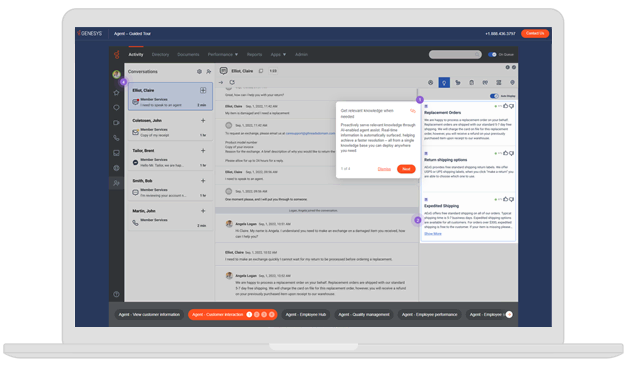
Manage email with a unified interface

Empower agents to search across channels to better understand customer concerns, solve issues faster and get more out of each exchange.

Navigate high-volume emails efficiently

Maintain distribution visibility, set priorities with business rules and route email to the right agents for fast and effective resolutions.

Learn from every email with real-time analytics

Spot trends, identify issues and evaluate historical and real-time performance to improve your customer experience.

Create great experiences with better email tools

Manage, prioritize and personalize email at scale.

Create greate experiences

Robust categorization and prioritization

Automatically capture, classify, prioritize and route email with advanced management tools. Configure rules to prioritize messages based on key criteria, such as a customer’s relative value to your company.

Real-time and historical reports

Oversee email KPIs with real-time analytics and historical reports. Analyze trends by customer segments or agent interactions, and boost email response rates and customer satisfaction with actionable insights.

Attachments, images and rich text

Email never looked so good with management tools that enable inline images and rich text formatting. Agents can add bullets, change colors and fonts, highlight text in bold — and use dynamic email signatures for personalization.

Canned responses

Stay consistent and respond to customers quickly with standardized replies. Agents can edit standard responses to customize messages and add frequently used inline images with a single click.

Custom “Mail From” addresses

Signed, sealed and delivered. Using your own “Mail From” domain gives you more flexibility to comply with email authentication protocols — a valuable option for your customer service.

Address blocking, spam and security

Clear the clutter by blocking specific addresses from reaching agents. If we detect a virus, we automatically disconnect. For spam, we refer to the customer’s configuration for a decision on how to handle it.

Outbound email campaigns

Get proactive and send personalized messages to a list of contacts. Create and manage multiple lists, define segments, build dynamic content templates and schedules for total control of outreach notifications.

Seamless customer journey

Give customers an experience that says “We know you.” Empower agents with full visibility into past interactions across channels, while threading email responses for synchronous agent and customer experiences.

Agent assistance

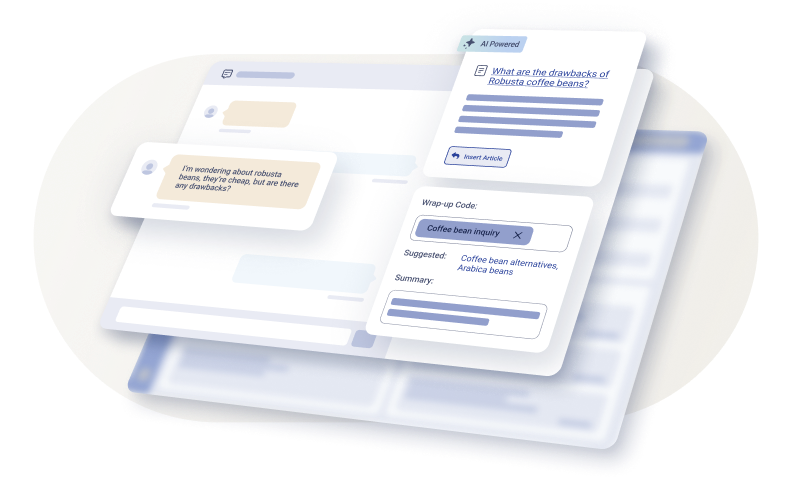
Give agents access to artificial intelligence (AI)-led answer assistance, tapping into the same knowledge used for self-service in other channels. And enable faster agent training so they have key details on less familiar topics to avoid transferring.

Agentless notifications

Send email notifications automatically without involving contact center agents. Customers get helpful and timely notifications automatically, such as shipping on an order or reminders on upcoming scheduled appointments.

Email delivery receipts

For email campaigns and agentless notifications, take advantage of supply delivery receipts. Quickly see whether an email was sent and how the recipient engaged. This gives you essential data to evaluate the effectiveness of email outreach.

Supervisor management tools

Empower supervisors with tools to help manage agents. Supervisors can view what’s waiting in the queue, get a snapshot of everything happening and manually assign email messages to agents via other routing methods.

An expanded agent toolbox

Enhance agent flexibility in handling email inquiries with the ability to respond to closed interactions, perform multiple actions on a single email and park email exchanges. Administrators also get dedicated analytics, such as tracking the average time emails are parked.

Powerful email management built for modern CX

Modernize your customer support and help desk operations with advanced email automation designed for agents and supervisors. With built-in reporting and both agent-assisted and agentless responses, you can streamline email handling and deliver seamless, high-quality customer experiences at scale.

Categorize and prioritize emails using AI

Automatically capture, classify, prioritize and route email with advanced management tools. Configure rules to prioritize messages based on key criteria, such as a customer’s relative value to your company.

Insert attachments, images and rich text

Management tools enable inline images and rich text formatting. Agents can add bullets, change colors and fonts, highlight text in bold — and use dynamic email signatures for personalization.

Manage outbound email campaigns

Get proactive and send personalized messages to a list of contacts. Create and manage multiple lists, define segments, build dynamic content templates and schedules for total control of outreach notifications.

Automate email notifications

Send helpful and timely email notifications — such as shipping on an order or reminders on upcoming scheduled appointments — automatically without involving contact center agents.

Deliver a complete agent email workspace

Give full visibility into past interactions and maintain threaded responses. Respond to closed interactions, take multiple actions on a single email and park conversations as needed.

Send customers the right message with AI-powered email support

Individual contact center agents often struggle to find the most important email message to work on first. The routing capabilities from Genesys automatically get the right message to the right agents for the right results. Our email management software capabilities make it easy to create an integrated email experience.

Omnichannel email management for contact centers

Email is one of the fastest, easiest communication channels for customers. To make it fast and easy for your customer service team, email with voice, chat and messaging in one unified contact center platform. Improve agent productivity and customer satisfaction with AI-powered email management that integrates seamlessly across all channels.

Fully integrated email interactions

Consolidate customer email communications into one platform and interface. Enable agents to view complete conversation history across channels, resolve issues faster and maximize email interaction value.

Intelligent email routing

Route emails based on skills, workload, CRM data and business rules. Distribute messages to multiple queues automatically and prioritize based on customer value and urgency.

AI-powered agent assistance

Optimize agent workloads with automatic email routing and channel prioritization. AI assistance provides suggested responses and knowledge base articles to improve accuracy and speed.

Email analytics and performance insights

Monitor email performance with centralized analytics dashboards. Track response times, resolution rates and agent productivity to continuously improve customer service operations.

Make email a key part of your omnichannel customer journey

Email management tools built into your contact center software help remove silos and add valuable customer context your support team might be missing. Improve your customer experience by bringing all points of contact into a single system. See how to keep email in the conversation.

Thank you for your interest.

We’ll contact you directly to set up a date and time that works with your schedule.

Frequently asked email customer service questions

What is customer service email support?

Customer service email support is a service channel where businesses respond to customer questions, concerns or issues through email. It allows customers to explain their problems in detail at a time that works best for them while creating a written record of the conversation. Email support agents must communicate clearly, use proper grammar and provide accurate resolutions to create a positive customer experience.

What are the advantages of using contact center email software?

Email on its own may not seem as complex as some other forms of digital communication, but as a part of your larger call center solution, it’s connected to the rest of your customer service ecosystem. When a customer sends an email to follow up on a phone call, they don’t want to have to explain the phone call. With contact center email software, the context is recorded and provided to your agent so they understand the customer’s journey.

Additionally, outbound email campaigns can be managed; all emails are automatically captured, classified, prioritized and routed; and analytics and performance insights can be housed in the same place the rest of your email is managed.

Can contact center email software be integrated with other communication channels?

Yes, with the right contact center software solution all of your communications channels can be integrated in one place. This allows for cross-channel analytics, preservation of conversational context across channels, and integration with other powerful tools like workforce management tools and agent performance management, quality management functionality, and more.

How can I improve email customer service?

Improving email customer service can involve several strategies. These could include: ensuring prompt responses, providing clear and comprehensive replies, personalizing communication, using proper grammar and tone, providing self-service resources, and continuously training and supporting your customer service team. It’s also helpful to monitor and analyze your email support to identify areas for improvement.

What advanced features are essential in contact center email software for optimal performance?

First, your call center software should offer a unified interface. One of the best ways to ensure efficiency and quality of interactions is to put all communications in one place, no matter the channel. Context is preserved, and all the information a contact center agent needs is in one place at the same time.

It also must be able to handle high volumes of emails at any given time. No matter what product or service you offer or the number of agents you employ, for businesses of all sizes your inbox can get hit with a flood of inquiries. It’s a must that your software can handle that efficiently.

Finally, built-in analytics are key. Being able to see what is and isn’t working within the same platform you’re already using is a game changer. You can compare channels, spot trends and identify issues historically or in real time.

Does Genesys have a ticketing system?

The Genesys Cloud™ platform isn’t designed to be a ticket management system, but it does integrate with them. Instead, Genesys Cloud offers many more efficient routing methodologies, including skills, language requirements, keywords that include phrase matching in the subject line, bullseye methodology, availability and more. This enables you to automatically get the right incoming message to the right contact center agents and reduce the chance of multiple agents mistakenly taking the same interaction.

Genesys Cloud also uses the same routing engine for email messages as it does for voice and other digital interactions. That means all insights from these interactions automatically update data in Genesys Agent Copilot and Genesys Knowledge. As a result, you can serve real-time customer data and relevant information to agents, enabling them to continually improve the customer service.

What makes a good customer service email?

Customer service channels, social media and live chat (or asynchronous chat) continue to grow in popularity. But email is still critical. Before you click “Send,” make sure your customer service email shines. Here’s how:

  • Make it personal – Address the recipient by name and reference other details that are relevant to the interaction.
  • Show empathy – Even a simple “I understand” acknowledges the recipient’s feelings; it’s respectful.
  • Don’t waste your customer’s time – Pick up the conversation where it left off, with full context. Try to avoid asking a customer to repeat themselves.
  • Be positive and consistent – A positive attitude gives customers confidence in you and your brand.
  • Use clear and simple language – Avoid jargon with the potential to confuse. Remember: Your email could go to people with different backgrounds, ages and skill levels.
  • Share resources – Including links to related information could help a customer get their answers faster via self-service.

How does contact center email software ensure data security and privacy compliance?

Email security is critical, particularly because of its wide use and potential for scams. It’s very important to ensure your contact center email software has up-to-date and potent security in place to protect against the loss or access of personally identifiable data. Make certain your security team has the right tools in place to be able to succeed.

What security measures are in place for email customer service to protect against malicious files and spam?

Genesys Cloud handles incoming emails using AWS Simple Email Service (SES), which scans the messages for malware. If SES detects a virus, or if the virus scan is incomplete or inconclusive, Genesys Cloud automatically disconnects the email, preventing it from being sent to a queue. In addition, you can block specific email addresses to prevent unwanted messages from reaching agents.

Amazon SES authenticates the email and scans it for the following:

  • The IP address of the remote host that delivered the email to Amazon SES is checked against the SPF policy specified under the MAIL FROM’s domain used during the SMTP transaction.
  • The DKIM signatures present in the email’s header section are checked.
  • The email content is scanned for spam and malware.
  • When SES identifies an email as spam, Genesys Cloud processes it according to the spam routing settings you configured during automatic call distribution (ACD) email address setup. If the SES analysis is inconclusive or fails to mark the email as spam, the email may still be routed to a queue and could reach an agent.

There are also ways of authenticating outbound email to help ensure you maintain a good sending reputation. These include:

  • SPF: Used to detect spoofing, SPF identifies which mail servers are allowed to send mail on behalf of your MAIL FROM domain. Mail systems refer to the SPF TXT record to determine whether a message from your custom domain comes from an authorized server.
  • DKIM: This adds a digital signature to your outbound messages in the email header. The recipient server uses that signature to verify that the email is signed by a key owned by the domain. Because the digital signature stays with the email message no matter what as part of the email’s header, DKIM works even when a message has been forwarded between mail servers, as long as the message content has not been modified.
  • DMARC: SPF and DKIM alone don’t ensure that the From address is authenticated; SPF only checks the domain specified in the MAIL FROM address and DKIM only checks the domain specified in the DKIM signature, neither of which are seen by the email recipient. DMARC is designed to ensure there is domain alignment with at least one of SPF and DKIM.

What tools do supervisors have to manage email communication?

Supervisors can view queue activity, monitor overall workload and manually assign emails to agents as needed. Genesys Cloud also allows supervisors to preview the content of active emails before assignment, providing clear visibility into each message and enabling more informed, efficient workload distribution.

Can administrators configure email integrations?

With Genesys Cloud administrators can use the custom Microsoft Graph integration to both send and receive emails. This setup supports encryption, malware scanning and virus detection. Alternatively, they can integrate a custom SMTP server or use the default Amazon Web Services Simple Email Service (SES) for outbound messages, and an SMTP or IMAP server for inbound messages.

Are agents able to use canned responses when replying to an email?

Yes, you can stay consistent and respond to customers quickly with standardized replies. Agents can edit standard responses to customize messages and add frequently used inline images with a single click.

Is it possible to track whether emails were delivered and how recipients engaged with them?

For email campaigns and agentless notifications, you can quickly see whether an email was sent via a delivery receipt and also how the recipient engaged, giving you essential data to evaluate effectiveness.

Can I restrict which email domains agents are allowed to send to in Genesys Cloud?

Genesys Cloud allows organizations to configure an approved list of email domains that agents are permitted to send emails to. This capability is ideal for customers who want to limit outbound email communication to specific internal or trusted external domains, helping enforce security, compliance and brand controls.

With this feature enabled, agents can only send or reply to email addresses that belong to the configured domain list. If an agent attempts to send an email to an address outside the approved domains (such as a public email provider), the message will be blocked and bounce back.

This is particularly useful for scenarios where customers use tokenized or masked email addresses, such as when a third-party platform provides anonymized sender addresses. In these cases, replies are allowed only to approved domains, and any attempt to send messages outside those domains is automatically prevented either by Genesys Cloud or the customer’s email infrastructure.

This approach ensures agents communicate only within approved boundaries while still allowing replies to legitimate inbound emails.